Sunday, August 15, 2010

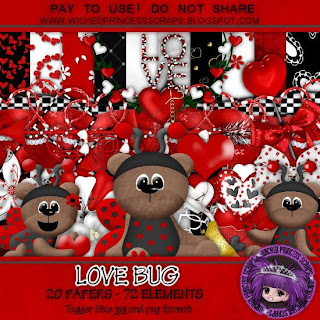
Love Bug

Shani has a couple of new kits out, one of them is a cutie called Love Bug.

I made a tag using just the kit.


Tutorial for Love Bug Tag 1

I used an adorable new kit from Wicked Princess Scraps called “Love Bug”.
I used Adobe Creative Suite 4 to make this tag, but it can be created in any of the major graphics software programs. Have transform controls activated (in PS Elements, show bounding box, in PSP, activate the pick tool.)

Open a new blank document 700 pixels x 700 pixels. Use the circular selection tool to create a circle. Fill with background of choice (paper 6).
Copy & paste your choice of elements. Resize elements as needed & arrange in a way you like.
Don't hesitate to move elements' layers up or down or to make layers invisible during the creative process. I applied the bevel & emboss effect in the CS4 program to each element in this tag. You may want to experiment with effects.
. I used Ottum Hmk Bold as the font for all the text. To curve the text, right click in text layer, choose warp text, followed by arch.
When you are happy with the results, merge visible & save.

Enjoy.

Wednesday, August 11, 2010

Fairy garden quick page & a sale


I've made a quick page from a cute new kit by Sweet Occasions Designs called Fairy Garden.

The poser I used is included in the kit & is created by outlaw by design.
check out a fantastic sale at The Creativity Box
starts tomorrow - don't miss it!
Enjoy.

Monday, August 9, 2010

September 2010 desktop calendar


I decided to make sure I got the September desktop calendar finished & posted early since I am going into the hospital for surgery later this month.
I tried something a little different this time & used Wicked Princess' tag kit called Victoria Dove. It's on sale right now, if you're interested. There was so much in the kit it was hard to choose what to use.


Last month I tried uploading to Media Fire & couldn't find the file after it said it was uploaded, but I tried again with the desktop & this time it worked (I hope). Anyway I switched because 4 shared has gotten so ridiculous with their wait times for free users & I can't afford a premium account (with its premium price tag). September 2010 desktop
Hope you like it.
Enjoy.

Wednesday, July 28, 2010

August 2010 desktop - Mama's Garden


I used a lovely kit from Wicked Princess Scraps called Mama's Garden for my August 2010 desktop. My recent injury has necessitated elevating of my leg, limiting my computer time. I haven't been able to carve out enough time to create anything else for you. Hopefully that will change soon.
Enjoy.

Friday, July 2, 2010

Keep Cool


Well, Wednesday night I slipped when trying to transfer from bed to wheelchair, my leg went under the chair. I was sure I'd broken it after hearing a loud snap along with excruciating pain. After over 5 hours in ER they finally xrayed. Nothing broken, but muscles & ligaments are torn, badly sprained & bruised. Hard to work at computer & keep the leg elevated, plus the pain is exhausting me. But I spotted an email from Tina of Lady Saphire Designs advertising her latest kit & just had to work with it.

Keep Cool is available in both full size & tag size.


I did 2 layouts, created a quick page based upon each for you to download as a set, and a tag with tutorial.


Tutorial for “Keep Cool” tag
What I used:
Kit called “Keep Cool” by Lady Saphira, http://yourscrapaddiction.com/index.php?main_page=product_info&cPath=1_127&products_id=2695 (tag size)
http://yourscrapaddiction.com/index.php?main_page=product_info&cPath=1_127&products_id=2695
(full size)
Cookie poser by Lisa of Sophisticated Scraps http://sophisticatedscraps.blogspot.com
Adobe Photoshop Creative Suite 4 (Make sure “show transform controls” is checked for easy resizing of elements.)

What I did:
Open a new transparent canvas 700 pixels x 700 pixels. Use Circular selection tool to create a circle & fill with background of choice (paper 1).
Choose elements to fit your vision. I used tree, sun chair, hat, ice 3, butterfly 4, and shells 1,2,3. Copy & paste each element, resizing as needed & positioning as desired. Copy & paste your poser of choice (Lisa cookie 4), positioning as desired.
Use font of choice for desired text. I used a cute sandcastle font 12 (http://www.ellies-treasures.com/fonts/alphadings-seasons/alphadings-seasons.html) for main text & name. I used a small font (Arial 3) for tag information.
Merge visible & save.

Enjoy.

Tuesday, June 29, 2010

July 2010 desktop calendar


Well, spent most of yesterday in the ER. I've got an infection somewhere; not sure where - but my urine test showed large amounts of white cells, which is apparently a certain sign of infection.

So to be on the safe side, I'm posting the July desktop calendar early.
Enjoy.

Friday, June 25, 2010

number of links - who's on what?

I've had a complaint about the number of zips my kits are divided into. The scrapbooking stores require designers keep their zips 30MB or smaller to accommodate those using dial-up internet. I know that dial-up times out on larger downloads - I switched to high speed because I needed to download government documents & I couldn't do it on dial-up, my connection would go down part way through every time.
I've been following store policy to make my kits accessible to dial-up users, but have no idea how many of you are using dial-up and how many are using high speed. I need some feedback - someone has requested larger zips (200 MB). If there are enough of you who would appreciate significantly larger zips, I could combine the smaller zips into larger zips, place them in a folder marked ld (large download), but with all the time I put into making the kits, zipping, uploading; well if you are on highspeed, downloading shouldn't be that much of a problem & hopefully those on dial-up appreiate me trying to make my kits available.
So I need to know - how many want 200 MB zips to download made available? Keep in mind that if I have to do this I may have to delete past freebies to make room in my account, so if there's only a couple of people who want this, it'll be a no-go.
Let me know, please?

Take care